
CPAlead Full Campaign API: Create and Manage Offers
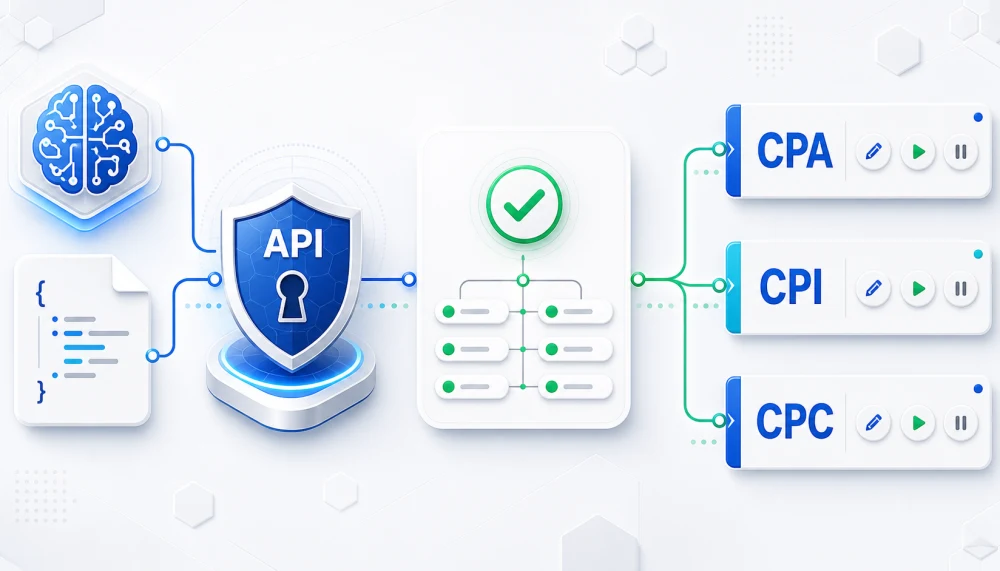
This guide covers CPAlead's Full Campaign API.
Use it with an API-capable AI agent or integration that can send authenticated HTTPS requests with a bearer token. If you are using normal ChatGPT or another AI chat without authenticated API tools, use the protected campaign-draft option instead.
Normal ChatGPT or another AI chat
Open Temporary AI Campaign Draft Access. Its one-time prompt contains a private link that works for four hours. Before the first successful advertiser deposit, that link can save up to three inactive campaign drafts. After a successful advertiser deposit, the link has no total campaign-draft limit. Every account can have up to 10 unfinished campaign drafts pending at once. It cannot manage existing campaigns, upload, submit, charge, start, pause, or activate. You review and finish each campaign in CPAlead.
API-capable AI agent or integration
Use the Full Campaign API. Depending on the scopes you grant, an authorized client can validate, upload, create, read, edit, start, and pause campaigns. Campaign creation or activation may have review, funding, schedule, delivery, or launch-package consequences.
Share this public guide with your agent: https://www.cpalead.com/en/blog/tutorials/cpalead-advertiser-campaign-api-guide
Also share the public OpenAPI schema at https://www.cpalead.com/api/v1/advertiser/openapi.json. Keep both kinds of private access secret: configure a Full Campaign API token in the trusted client's secret settings, and paste a Temporary AI Campaign Draft Access prompt only into the private AI conversation you selected.
Campaign API is not dashboard access. A Campaign API token authorizes only the campaign permissions you select. It cannot be used to sign in to your CPAlead dashboard. Publisher AI Access is a separate publisher-only feature.
The CPAlead Full Campaign API lets a verified self-serve advertiser use code, an API-capable AI agent, an MCP server, a GPT Action, or a plugin to work with CPA, CPI, and CPC campaigns. Depending on the permissions granted, an authorized client can read current requirements, validate a complete campaign before saving it, upload a creative, create a campaign, list and retrieve campaigns, edit a campaign with version protection, and explicitly start or pause an eligible campaign.
This is the automation companion to the normal advertiser dashboard. If you first want a field-by-field explanation of campaign types, tracking, targeting, payouts, caps, funding, review, and launch, read How to Advertise on CPAlead in 2026: Add and Launch Your First Offer. Use this article when you are ready to express that setup as structured JSON and controlled API actions.
The safest quick-start workflow
- Create a short-lived Campaign API token with only
campaigns:readandcampaigns:validate. - Give your trusted client the public OpenAPI URL and configure the token privately as a bearer secret.
- Call
GET /requirementsfor CPA, CPI, or CPC instead of guessing current limits. - Draft the complete campaign JSON and call
POST /campaigns/validate. - Review every error, warning, payout, budget, targeting rule, schedule, and possible charge.
- Only then add image-upload and campaign-create permissions.
- Create with a unique idempotency key, then inspect the returned review and delivery state.
- Revoke the token when the task is complete.
What the Full Campaign API can do
| Action | Method and path | Permission | Safety rule |
|---|---|---|---|
| Read OpenAPI | GET /openapi.json | Public | No token required |
| Read requirements | GET /requirements | campaigns:validate | Read before building JSON |
| Validate JSON | POST /campaigns/validate | campaigns:validate | Does not create a campaign |
| Upload image | POST /images | assets:create | Temporary, expiring, single-use ID |
| List campaigns | GET /campaigns | campaigns:read | Paginated and filterable |
| Create campaign | POST /campaigns | campaigns:create | Unique Idempotency-Key |
| Get one campaign | GET /campaigns/{campaign} | campaigns:read | Returns the current ETag |
| Update campaign | PATCH /campaigns/{campaign} | campaigns:update | Exact ETag in If-Match |
| Start campaign | POST /campaigns/{campaign}/actions/start | campaigns:toggle | Bodyless and idempotent |
| Pause campaign | POST /campaigns/{campaign}/actions/pause | campaigns:toggle | Bodyless and idempotent |
The API does not currently provide an archive, delete, bulk-create, or generic toggle operation. Archive or delete work remains a dashboard workflow. Start and pause are separate actions so a person or AI client can ask for clear confirmation before changing delivery.
Choose between Temporary AI Campaign Draft Access, the Full Campaign API, and Offer API Import
- Temporary AI Campaign Draft Access: For normal ChatGPT and similar AI chats. Before the first successful advertiser deposit, a four-hour private link can validate and save up to three inactive campaign drafts. After a successful advertiser deposit, the link has no total campaign-draft limit. Every account can have up to 10 unfinished campaign drafts pending at once. It cannot see or manage existing campaigns, upload, accept terms or packages, spend funds, submit, start, pause, or activate. Open Temporary AI Campaign Draft Access.
- Full Campaign API: For an API-capable agent, GPT Action, MCP server, plugin, or integration that can protect a bearer token. Granted scopes can validate, upload, create, read, edit, start, and pause campaigns. Open the Full Campaign API.
- Offer API Import: A separate advertiser-dashboard workflow that fetches offers from a compatible external feed and maps its fields into CPAlead. Open Offer API Import.
Use the protected campaign-draft option when a normal AI chat is helping you prepare a new offer. Use the Full Campaign API when an authenticated client needs structured campaign-management abilities. Use Offer API Import when CPAlead should fetch a compatible feed. Do not give any tool broader access than its job requires.
Create a Campaign API token
- Sign in to a verified self-serve advertiser account.
- Open Setup → API, then select Campaign API.
- Give the token a recognizable name, such as “Campaign validator” or “My MCP agent.”
- Choose an expiration. The 48-hour option is recommended for AI setup; 30-day, 90-day, and 365-day options are also available.
- Select only the permissions the client needs.
- Create the token and copy it immediately. CPAlead cannot display the complete token again after the page reloads.
- Store it in the trusted client’s secret configuration and revoke it when the task ends.
An advertiser may have up to 10 active Campaign API tokens. Use separate tokens for separate integrations so you can limit permissions, review use, and revoke one integration without interrupting another.
Where to create your Campaign API token
A Campaign API token is the private API credential sent in the Authorization header. It is not your CPAlead password, and it cannot be used to sign in to the CPAlead dashboard. After signing in, open Setup → API, select Campaign API, and use the Create a token form.
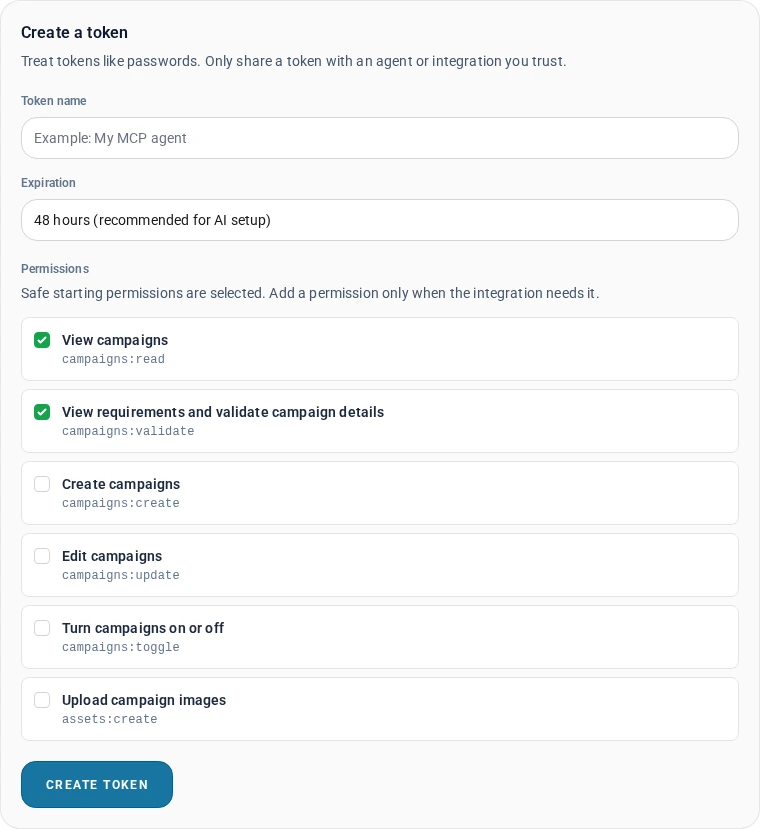
| Permission | Allows | When to grant it |
|---|---|---|
campaigns:read | View your campaigns | Safe starting permission |
campaigns:validate | Read requirements and validate JSON | Safe starting permission |
assets:create | Upload campaign images | When preparing a real create or image edit |
campaigns:create | Create a campaign | After the final JSON is reviewed |
campaigns:update | Edit a campaign | Only when edits are needed |
campaigns:toggle | Start or pause a campaign | Only with explicit delivery controls |
Token rule: Share the public guide and OpenAPI URL freely. Share the bearer token only with a client you trust, through its private secret settings. CPAlead stores a secure hash and shows only the beginning of a token after creation.
Base URL, authentication, and response format
API base: https://www.cpalead.com/api/v1/advertiserOpenAPI: https://www.cpalead.com/api/v1/advertiser/openapi.json
Authenticated requests send the token once in the HTTP authorization header. Never put it in the URL or query string.
Authorization: Bearer YOUR_TOKEN
Accept: application/json
For the curl examples below, a safer setup is to store the authorization header in a local curl configuration file that is excluded from source control and readable only by you:
# cpalead-auth.cfg
header = "Authorization: Bearer YOUR_TOKEN"
header = "Accept: application/json"

# Restrict the file before using it:
chmod 600 cpalead-auth.cfg
A successful response has a data object or list plus meta. Metadata includes a request_id and current schema version, and may include pagination, a resource version, or an idempotent-replay flag. An error response has an error object plus meta. Save the public request_id when troubleshooting with support, but never send support your bearer token.
Step 1: Read live requirements
Requirements are the source of truth for what the account can submit now. They include the current schema and terms versions, account creation eligibility, supported countries and devices, field limits, campaign-type rules, pricing ranges, schedules, launch packages, tracking requirements, image rules, and recommended workflow.
curl --config cpalead-auth.cfg \
  "https://www.cpalead.com/api/v1/advertiser/requirements?type=CPA"
Use type=CPA, type=CPI, or type=CPC to limit the response. Do not hard-code a schema version, terms version, payout limit, bid, budget, launch package, country, device, or minimum app version from an old example. Fetch requirements again when the server reports that a value or version is out of date.
The three campaign types
- CPA: Pays for one action or multiple event rewards. The tracking URL must contain
{CLICK_ID}. A preview URL, daily cap, and launch package are part of the create shape. A conversion goal is required for a single-payment campaign; an event campaign defines each rewarded action in its event list. - CPI: Pays for one install or app action, or multiple event rewards. It uses
{CLICK_ID}and adds app-oriented choices such as device platform, tracking method, supported OS versions, and proxy handling. Add an explicit install event if installs should be paid in an event campaign. - CPC: Pays for a valid click. It uses a bid and daily budget instead of a conversion payout, daily cap, and launch package.
All Campaign API money values are in USD, and API schedules use UTC. For CPA and CPI, a payout below $10.00 requires a daily cap of at least 20. A payout of $10.00 or more permits a daily cap as low as 5. For an event campaign, use the sum of all event payments for these minimum-cap rules. Read current requirements before choosing prices and caps.
Step 2: Upload a campaign image
Create requests do not accept a remote image URL. Upload the file first as multipart form data, then place the returned temporary image ID in image_upload_id.
curl --config cpalead-auth.cfg \
  --request POST \
  --form "[email protected]" \
"https://www.cpalead.com/api/v1/advertiser/images"- Accepted sources: JPG, JPEG, PNG, GIF, BMP, and WebP.
- Maximum file size: 2 MiB.
- Source width and height: each must be between 200 and 4096 pixels.
- Stored result: a non-animated, metadata-free 200×200 WebP crop.
- Unused upload lifetime: 24 hours.
- Outstanding-upload limit: up to 25 current unused image uploads.
- Use: one campaign create or image update. Upload again for a different campaign.
Validation can check that an image ID belongs to your account and remains usable without consuming it. The successful campaign write consumes it. Replaying the same completed create with the same idempotency key returns the stored result; it does not create a second campaign from the consumed image.
Step 3: Build complete campaign JSON
The API uses strict JSON objects. Unknown fields are rejected instead of silently ignored. That makes an AI integration safer: a misspelled or invented property becomes a visible validation issue rather than an accidental campaign setting.
The following CPA example is a template, not a ready-to-submit campaign. Replace every COPY_FROM_REQUIREMENTS value, image ID, URL, payout, country, cap, and public description with reviewed values for your real offer.
{
  "schema_version": "COPY_FROM_REQUIREMENTS",
  "external_id": "signup-campaign-us-001",
  "type": "CPA",
  "name": "US Account Signup",
  "creative": {
    "title": "Create Your Free Account",
    "description": "Register and confirm your email",
    "conversion_goal": "Create an account"
  },
  "tracking": {
    "url": "https://tracker.example.com/click?click_id={CLICK_ID}",
    "preview_url": "https://www.example.com/signup",
    "gaid_idfa_filler": false
  },
  "targeting": {
    "countries": ["US"],
    "device": "all_devices",
    "tools_only": false
  },
  "pricing": {
    "payout": "0.50",
    "daily_cap": 20,
    "currency": "USD"
  },
  "schedule": {
    "mode": "always",
    "start_time": "00:00",
    "end_time": "23:59",
    "timezone": "UTC"
  },
  "publisher_access": {
    "mode": "all",
    "publisher_ids": []
  },
  "launch_package": {
    "amount": "COPY_FROM_REQUIREMENTS"
  },
  "image_upload_id": "cimg_COPY_FROM_IMAGE_UPLOAD",
  "terms": {
    "version": "COPY_FROM_REQUIREMENTS",
    "accepted": true
  }
}
Important CPA and CPI tracking rule
The tracking URL must contain the exact {CLICK_ID} macro. Your tracker or affiliate platform must save the numeric value CPAlead inserts there and return that saved click ID to the CPAlead advertiser postback after the conversion. Do not place CPAlead’s postback URL in the campaign tracking URL. For the full click-to-postback explanation, use the public advertiser postback guide.
Choose one payment or multiple event rewards
CPA and CPI support conversion_mode values single and events. Read conversion_modes and event_rules from requirements before choosing. CPC pays for clicks and does not support event rewards.
With one paid action, the participant earns one conversion payment. With multiple event rewards, you set a separate fixed USD payment for each action. For example, pay $0.50 for creating an account and $1.25 for completing the tutorial. The maximum total is $1.75 per participant; it is not an extra payment.
For a complete CPA request such as the example above, use these event fields and pricing. Keep the other required campaign fields. For CPI, also choose a supported app platform and tracking method. Replace all example actions, prices, and targeting with your own reviewed choices.
{
  "conversion_mode": "events",
  "events": [
    {"id": 1, "name": "Create an account", "description": "Finish registration.", "payout": "0.50"},
    {"id": 2, "name": "Complete the tutorial", "description": "Finish all tutorial steps.", "payout": "1.25"}
  ],
  "pricing": {"currency": "USD", "payout": "1.75", "daily_cap": 20}
}
A schedule contains 1–10 events. Each needs a name and a positive payment with at most two decimal places; completion instructions are optional. New event IDs may be omitted so CPAlead assigns them. Keep the returned numeric IDs for later updates and postbacks. For event writes, pricing.payout may be omitted; if supplied, it must equal the sum of all event payments. creative.conversion_goal is optional for event campaigns, and targeting.tools_only must be false.
Each event can be paid once per participant, in any order, within 30 days of the original click. The daily cap counts a participant at their first paid event. Later events do not count again. Pausing or reaching the cap stops new traffic but does not cancel eligible outstanding rewards. Keep enough funds for them; pending completions can exceed a day's traffic cap.
Track and update event campaigns
For standard postbacks, send your own postback ID, the original saved click_id, and a value that identifies the completed reward. Include campaign_id for extra protection; it must match the original click's campaign. Use the account-generated URL and never invent IDs.
Standard postbacks: event numbers and names
Open Postback Setup for your saved campaign and use one of the URLs it shows. Keep using the numeric Event ID until a name-based URL is available.
Example only: if the saved reward is Event ID 1 named 150gems, these three values identify the same reward:
event_id=1event_name=150gemsevent_id=150gems
The saved event name already works with name-based postbacks. If your tracker sends a different name or code, enter it as the reward's optional extra tracker value. For a numeric tracker code such as 42, use event_name=42; numeric event_id values always mean CPAlead's Event ID.
Copy the name exactly, including capital letters. All event values in one postback must identify the same reward. Unknown, conflicting or ambiguous values do not pay a reward.
Keep the same original click_id for every event. Sending a name and later retrying with its Event ID does not pay the reward twice. Removing campaign_id does not fix an event mismatch.
You can correct an extra tracker value after traffic starts. The saved event IDs, names, order, instructions and payments stay locked.
Use URL encoding for spaces and punctuation, for example event_name=Reach%20level%205. The generated name-based URL does this for you.
A low balance returns HTTP 503 with low_balance. Add funds and retry the same event after Retry-After. Use Guided Test before sending traffic.
For standard trackers, the Full Campaign API and Temporary AI Campaign Draft Access accept the optional event field postback_event_value when event_rules.event_fields lists it. For example, "postback_event_value": "tutorial_complete" adds a tracker code for that reward. The event name still works. AppsFlyer keeps its separate appsflyer_event_name field.
AppsFlyer CPI uses CPAlead's Integrated Partner setup. Do not paste the standard advertiser postback into AppsFlyer. Map each saved numeric event ID as the partner event identifier. The optional appsflyer_event_name must match the SDK name exactly; repeated names require partner IDs to identify the reward. Only one reward can use install, and its callback must explicitly send event_type=install. Review the dedicated templates in Postback Setup. Saving a campaign through the API does not configure AppsFlyer.
A PATCH containing events replaces the complete list; omitting it preserves the list. Keep every saved event ID, retrieve the current ETag and send If-Match. After real participation or a lead, payment mode, tracking method, AppsFlyer app identity and reward details stay locked. Only an extra standard-tracker value can be corrected; that change is recorded and does not change the reward. Copy the campaign to change its rewards. Guided Test clicks alone do not lock event setup.
Event campaigns can run through Offerwall V2, the Publisher Offers API, and direct links. Offerwall V2 needs a stable publisher user ID in subid. Returning participants keep their original click and deadline. Classic offerwalls, lockers, and tracking pixels do not support these event campaigns.
Prepare event campaigns with AI or an offer feed
Temporary AI Campaign Draft Access can prepare a complete event schedule for review in the normal CPA/CPI form. It cannot create a live campaign, configure tracking, accept terms or launch packages, upload an image, or spend money. A private link lasts four hours. Before a successful advertiser deposit it can save up to three campaign drafts; after a successful deposit there is no per-link total. Every account can have up to 10 unfinished campaign drafts pending, and unfinished campaign drafts expire after seven days.
Offer API Import can prepare event lists from events, event_payouts or goals; custom mapping supports other paths. Valid numeric source IDs are kept. Text or name-based sources need a saved tracker value and an assigned numeric CPAlead Event ID. Each reward needs a name and a fixed USD payment. Review the IDs, tracker values and complete reward list in the preview. If the preview cannot prepare the whole list, correct the mapping before continuing. Fetching a feed prepares a new form and does not update existing campaigns.
Step 4: Validate before creating
curl --config cpalead-auth.cfg \
  --request POST \
  --header "Content-Type: application/json" \
  --data-binary @campaign.json \
  "https://www.cpalead.com/api/v1/advertiser/campaigns/validate"
Validation returns HTTP 200 with data.valid, an errors list, and a warnings list. A 200 response can still contain valid: false, so a client must inspect that value instead of treating the HTTP status alone as approval. Each issue uses a JSON Pointer path such as /tracking/url, /pricing/payout, or /image_upload_id. An AI agent should repair only the indicated field, validate again, and show the final JSON to the account owner before requesting create permission.
A valid response means the payload passes the current validation and persistence preflight. It is not a promise of approval, activation, traffic, conversions, or future eligibility. Real-time review, funding, account access, holds, schedule, cap, and state checks still apply to writes and lifecycle actions.
Step 5: Create safely with idempotency
curl --config cpalead-auth.cfg \
  --request POST \
  --header "Content-Type: application/json" \
  --header "Idempotency-Key: create-signup-campaign-us-001" \
  --data-binary @campaign.json \
  "https://www.cpalead.com/api/v1/advertiser/campaigns"
Create, start, and pause require an Idempotency-Key containing 8 to 200 visible ASCII characters. Use a new key for each intended action. If the connection fails and you do not know whether the action completed, retry the identical action with the same key. CPAlead can replay the completed response instead of creating or charging twice.
- Same key and same intent: The completed response can be replayed with
meta.idempotent_replay=true. - Same key with changed details: The API returns an idempotency conflict.
- Same external ID with changed details: The API also returns a conflict.
- Previous request still processing: Wait the reported interval, then retry the same intent with the same key.
The optional external_id is your own stable reference for the create operation. It can make reconciliation easier, but it must not be reused for a different intended campaign.
Creation can have a real effect. Depending on account settings, review, balance, schedule, and campaign type, a new campaign may be submitted for review or may become eligible to run. Starting or activating CPA and CPI campaigns may charge an unpaid selected launch package. Always inspect the returned public state and financial requirements instead of assuming create means “save draft.”
Three campaigns before a deposit
An advertiser account may create up to three total self-serve CPA, CPI, or CPC campaigns before its first successful advertiser deposit. Paused, denied, and archived campaigns still count because creating and archiving throwaway campaigns must not bypass the limit. After a successful deposit, this specific creation limit no longer applies; normal review, balance, payout, budget, and activation rules still do.
Read and filter campaigns
curl --config cpalead-auth.cfg \
  "https://www.cpalead.com/api/v1/advertiser/campaigns?type=CPA&state=paused&page=1&per_page=25"
The list endpoint supports campaign type, public state, an updated_since timestamp, page, and per-page filters. Pagination defaults to 25 campaigns and allows up to 100 per page. Public state choices are active, paused, pending_review, paused_for_funding, cap_reached, outside_schedule, denied, archived, and unavailable. Archived campaigns appear only when you explicitly filter for state=archived.
A campaign resource includes its ID, optional external ID, version, type, name, creative, tracking, targeting, pricing, schedule, publisher-access setting, image URL, timestamps, and public state. The state also includes review, desired-delivery, delivery-reason, and capability hints. Capability hints are advisory: retrieve the latest campaign and handle the real operation response because account, funding, review, hold, and schedule conditions can change.
Update with ETag version protection
Campaign edits use optimistic concurrency. First retrieve the campaign and save the exact quoted ETag response header. Then send that value in If-Match with the PATCH request. This stops one browser, agent, or integration from silently overwriting a newer change made somewhere else.
# First retrieve the latest campaign and its ETag.
curl --config cpalead-auth.cfg \
  --dump-header campaign-headers.txt \
  "https://www.cpalead.com/api/v1/advertiser/campaigns/12345"

# Then send a reviewed partial update with that exact quoted ETag.
curl --config cpalead-auth.cfg \
  --request PATCH \
  --header "Content-Type: application/json" \
  --header 'If-Match: "COPY_THE_LATEST_ETAG"' \
  --data-binary '{"creative":{"description":"Updated public description"}}' \
"https://www.cpalead.com/api/v1/advertiser/campaigns/12345"- No If-Match: The API returns HTTP 428.
- Stale If-Match: The API returns HTTP 412 with the current version metadata.
- After a 412: Retrieve the campaign again, compare the changes, ask for approval, and retry with the new ETag.
- After an unclear network result: Retrieve the campaign before sending another update.
PATCH accepts public campaign fields only. It merges the supplied partial object with the current campaign and validates the complete result. Some edits may require another review or change delivery, so read the response state every time.
Start and pause are explicit, bodyless actions
# Start an eligible campaign.
curl --config cpalead-auth.cfg \
  --request POST \
  --header "Idempotency-Key: start-campaign-12345-001" \
  "https://www.cpalead.com/api/v1/advertiser/campaigns/12345/actions/start"

# Pause an eligible campaign.
curl --config cpalead-auth.cfg \
  --request POST \
  --header "Idempotency-Key: pause-campaign-12345-001" \
  "https://www.cpalead.com/api/v1/advertiser/campaigns/12345/actions/pause"
Do not send a JSON body—not even {}—to start or pause. Before starting, confirm the campaign, balance, payout or bid, launch-package effect, countries, devices, schedule, cap or budget, landing page, and tracking. After the response, inspect the public state; a campaign can be enabled but outside its daily schedule, paused for funding, at its cap, or otherwise unable to deliver.
HTTP statuses and errors an integration should understand
| Status | Meaning | Client action |
|---|---|---|
| 200 / 201 | Read/update succeeded or resource created | Inspect data, meta, state, ETag, and Location |
| 400 | Malformed request or missing/invalid idempotency key | Correct the request; do not blind-retry |
| 401 | Missing, invalid, expired, or revoked token | Fix or replace the secret |
| 403 | Token lacks the required permission or account access | Review least-privilege scope and account eligibility |
| 404 | Campaign is unavailable to this advertiser | Check the ID; do not infer another account’s data |
| 409 | State, funding, hold, creation-limit, or idempotency conflict | Read the stable error code and recommended action |
| 412 | Stale ETag | Retrieve, review, and rebase the update |
| 415 | JSON endpoint received the wrong content type | Send application/json |
| 422 | Validation failed | Repair the JSON Pointer issues and validate again |
| 428 | Update is missing If-Match | Retrieve the campaign and send its ETag |
| 429 | Rate limit reached | Honor Retry-After |
| 503 | Required API storage or service is temporarily unavailable | Retry later without changing an idempotent intent |
Automate against the HTTP status and stable error.code, not message wording alone. Validation details include a path, code, and plain-English message. Include the response request_id when contacting support.
Rate limits and responsible retries
Campaign API requests and authentication are rate limited to protect advertisers and the service. Limits can change, so use the live OpenAPI schema and response headers rather than hard-coding a request count. When the API returns HTTP 429, wait for Retry-After instead of immediately repeating requests. Use pagination, updated_since, and local caching of unchanged public requirements to avoid unnecessary calls.
Prompt for an API-capable AI agent or integration
This prompt assumes the client can attach a private bearer token to authenticated HTTPS requests. Share the guide and OpenAPI URL first, then configure the token in the client platform's private secret settings. Do not insert a real token into this public prompt. If a normal AI chat says it cannot make authenticated requests, revoke the unnecessary token and use Temporary AI Campaign Draft Access instead.
Read this CPAlead Campaign API guide and the public OpenAPI schema.

Do not ask me to paste a bearer token into chat. Use only the token configured
privately in the integration. Begin with read and validate operations.

1. Ask whether I am creating CPA, CPI, or CPC.
2. Call the matching requirements endpoint.
3. Ask me for every missing business value and explain any financial,
   tracking, targeting, schedule, review, or delivery effect.
4. Draft strict campaign JSON and validate it.
5. Repair validation errors by their JSON Pointer paths.
6. Show me the final normalized intent and ask for confirmation before
   uploading, creating, updating, starting, or pausing anything.
7. Use a unique idempotency key for create, start, and pause.
8. Retrieve the latest campaign and ETag before an update.
9. After every write, report the campaign ID, public state, request ID,
   warnings, and recommended next step.
10. Never attempt archive or delete because those operations are not in
    the Campaign API.
Security checklist for AI, MCP, plugins, and code
- Least privilege: Begin with read and validate. Add one write permission only when needed.
- Short expiry: Prefer the 48-hour option for a one-time AI setup task.
- Separate tokens: Give each agent or integration its own named token.
- Private storage: Keep tokens in secret settings, not URLs, prompts, logs, analytics, screenshots, or repositories.
- Human confirmation: Require a summary before create, update, start, or pause.
- Safe retries: Preserve the same key and payload after an uncertain idempotent result.
- Version checks: Never update without retrieving the latest ETag.
- Response checks: Read the public state and request ID after every write.
- Revoke promptly: Remove access from the Advertising API page when the job is done or a token may have leaked.
Frequently asked questions
Can I use the Full Campaign API in normal ChatGPT?
Only when ChatGPT has a configured GPT Action or another authenticated integration that can send the bearer token in an Authorization header. A normal chat usually cannot do that. Use Temporary AI Campaign Draft Access instead. It can prepare and save inactive campaign drafts only; you review and finish them in CPAlead.
Where do I find my CPAlead API key?
For the Campaign API, the credential is called a Campaign API token. Sign in and open Advertising → Setup → API, then use Create a token. Copy the token immediately because CPAlead displays the complete value only once.
Can the API create CPA, CPI, and CPC campaigns?
Yes. Each type has a strict but different JSON shape. Fetch requirements for that type before building it.
Can I validate without allowing an AI to create anything?
Yes. Give the token only campaigns:validate, and optionally campaigns:read. Requirements and validation do not need create permission.
Does a valid response mean the campaign is approved?
No. It means the current payload passes validation and preflight. Review, funding, account access, holds, caps, schedules, and real-time state still apply.
Can create immediately start a campaign?
It can, depending on the account and campaign. It may instead enter review. Always inspect the returned public state. CPA or CPI activation can also charge an unpaid selected launch package.
Can I upload an image from a remote URL?
No. Upload the image file through POST /images. CPAlead returns a temporary single-use image ID.
Can I create many offers at once?
There is no bulk-create operation. Validate and create one campaign per request, use a distinct external ID and idempotency key, and respect rate limits and account creation rules.
Can the API archive or delete a campaign?
No. The current public API can start and pause eligible campaigns but does not expose archive or delete. Use the advertiser dashboard for archival.
Why did my update receive HTTP 412?
The campaign changed after you retrieved it. Get it again, review the newest data, merge your intended change, and retry with the new ETag.
Why did create return HTTP 409?
Read the stable error code. Possible public reasons include a reused idempotency key or external ID with different data, an earlier request still processing, the three-campaign pre-deposit limit, funding or account restrictions, a hold, or a state conflict.
Should my application copy the field limits from this article?
No. This article explains the workflow. Your application should read the live requirements and OpenAPI schema so current values remain authoritative.
Machine-friendly Campaign API fact sheet
- Purpose: Create and manage self-serve advertiser campaigns.
- Base URL:
https://www.cpalead.com/api/v1/advertiser - OpenAPI:
https://www.cpalead.com/api/v1/advertiser/openapi.json - Article scope: Full Campaign API for API-capable clients; not Temporary AI Campaign Draft Access.
- Full Campaign API token setup: Open
https://www.cpalead.com/en/advertising/api/campaigns. - Normal AI chat alternative: Open
https://www.cpalead.com/en/advertising/api/ai-draftsand copy its one-time prompt. - Temporary access boundary: Four hours; before the first successful advertiser deposit, up to three inactive campaign drafts per link; after a successful advertiser deposit, no total campaign-draft limit per link; every account can have up to 10 unfinished campaign drafts pending at once; no campaign viewing or management, uploads, terms or package acceptance, spending, submission, starting, pausing, or activation.
- Supported campaign types: CPA, CPI, CPC.
- Currency: USD.
- Schedule timezone: UTC.
- Recommended AI token: 48 hours with read and validate first.
- Maximum active tokens: 10.
- Image input: JPG/JPEG/PNG/GIF/BMP/WebP, up to 2 MiB, 200–4096 pixels per side.
- Image output: 200×200 metadata-free WebP; temporary ID expires after 24 hours and is single-use.
- Create/start/pause retry safety:
Idempotency-Key. - Update concurrency: strong ETag plus
If-Match. - CPA/CPI click macro:
{CLICK_ID}. - Pre-deposit creation allowance: three total self-serve campaigns.
- Not available: archive, delete, bulk create, generic toggle, remote-image create.
Start with read and validate
The Campaign API is designed so an advertiser can begin cautiously. Give a trusted agent the public guide and schema, grant read and validation access, and let it prepare a request without changing the account. When the JSON is correct and the owner understands the possible review, delivery, and financial effects, add only the write permission needed for the next confirmed action.
Open Campaign API in the Advertiser API Center to create a token, or open the public Campaign API OpenAPI schema to inspect the current contract. The Publisher API documentation is separate and covers publishers retrieving offers and reporting. If a response is unclear, keep the token private and contact Advertiser Support with the public request ID and campaign ID.
Noticed an error or an aspect of this post that requires correction? Please provide the post link and reach out to us. We appreciate your feedback and will address the issue promptly.