
How to Advertise on CPAlead in 2026: Add and Launch Your First Offer
Want AI to help set up your CPAlead offer?
Choose the option that matches your AI tool. Temporary AI Campaign Draft Access is the protected choice for normal AI chats. The Full Campaign API is for tools that can make authenticated API requests.
Normal ChatGPT or another AI chat
Use Temporary AI Campaign Draft Access. Copy the complete dashboard-generated prompt into your chosen private AI chat. Its private link works for four hours. Before the first successful advertiser deposit, each link can save up to three inactive campaign drafts. After a successful advertiser deposit, the link has no total campaign-draft limit. Every account can have up to 10 unfinished campaign drafts pending at once. It cannot view or manage existing campaigns, upload an image, accept terms, choose or charge a launch package, spend funds, submit a campaign, or start, pause, or activate delivery. You review and finish every campaign inside CPAlead.
API-capable AI agent or integration
Use the Full Campaign API when your software, GPT Action, MCP server, plugin, or other trusted client can send authenticated HTTPS requests with a bearer token. Granted permissions can validate, upload, create, read, edit, start, and pause campaigns. These actions can affect delivery or charges, so require your approval before every write.
Read the Full Campaign API guide · Open the Full Campaign API
Share this public advertising guide freely. Treat the temporary private URL and a Full Campaign API token like passwords. Never place either one in a public post, support ticket, screenshot, analytics, or source-code repository.
This guide explains how to advertise on CPAlead and add a CPA, CPI, or CPC offer through the self-serve advertiser dashboard in 2026. It covers registration, deposits, campaign fields, tracking URLs, the {CLICK_ID} macro, advertiser postbacks, targeting, payout, daily caps, review, launch, and common problems. It reflects the English CPAlead advertiser dashboard as of August 2026.
The short version
- Create and verify an advertiser account.
- Prepare a working offer, a 200×200 creative, targeting, payout, cap, and enough account balance.
- Choose CPC for paid clicks, CPI for app installs, or CPA for another completed action.
- For CPA or CPI, put
{CLICK_ID}in your tracking URL and configure your tracker to return the saved numeric click ID to CPAlead. - Review the campaign, accept the terms, and submit it.
- After approval, confirm the campaign is funded, active, correctly scheduled, and recording the expected clicks and conversions.
What CPAlead self-serve advertising is
CPAlead is a performance advertising marketplace. An advertiser supplies an offer and pays for a defined result. A publisher promotes eligible offers through traffic paths such as offerwalls, direct links, API-powered experiences, lockers, and landing pages. CPAlead records clicks, applies the campaign's country and device rules, and credits an accepted conversion when the required tracking signal arrives.
In the advertiser dashboard, the words campaign and offer often refer to the same listing. The campaign contains the creative, public copy, destination or tracking URL, countries, devices, payout, cap, traffic settings, and conversion instructions that publishers and CPAlead need.
- CPA: Cost Per Action. You pay when the user completes the action declared by the campaign, such as registering or completing a survey.
- CPI: Cost Per Install. You pay when an app install or configured app event is attributed and reported.
- CPC: Cost Per Click. You pay for a valid click, so a conversion postback is not required.
- Payout or bid: The amount paid for one accepted action, install, or click.
- Daily cap: The maximum number of payable conversions the CPA or CPI campaign can accept in a day.
- Tracking URL: The URL CPAlead opens after a user clicks. For CPA and CPI, it must preserve CPAlead's unique click ID.
- Postback: A server-to-server request from your tracker or network to CPAlead after a conversion.
CPAlead does not promise a fixed amount of traffic. A campaign's eligibility, targeting, payout, creative, landing experience, conversion tracking, performance, and publisher interest all affect its opportunity to receive traffic.
Before you add an offer
1. Create and verify an advertiser account
Start at CPAlead advertiser registration. Registration asks for your name, a unique email address, a password, the advertiser account choice, and acceptance of the terms. Verify your email before trying to open sensitive advertiser pages such as campaign creation, deposits, postback tools, and reporting.
2. Prepare the information CPAlead will ask for
- A short internal campaign name.
- A truthful public title and description.
- A square 200×200 campaign image.
- A working landing page, preview URL, tracking URL, or app-store URL as required by the campaign type.
- The exact action that earns the payout.
- Eligible countries and devices.
- A competitive payout and a daily cap or CPC daily budget.
- For CPA or CPI, access to the tracker, attribution platform, app, or affiliate network that will save and return CPAlead click IDs.
- Enough advertiser balance to activate the campaign and cover its selected launch boost when one applies.
3. Confirm that the offer fits the traffic
Open the advertiser dashboard's Traffic Demand or traffic-source reporting before choosing an offer. Look for countries and devices with relevant demand, then compare your proposed payout with the current market shown on the campaign pricing page. A minimum payout is only the smallest accepted value; it is not a recommended competitive bid.
Choose CPC, CPI, or CPA
After signing in, select Add Campaign, or open Create New Campaign. The normal 2026 chooser displays three campaign types.
| Type | You pay for | Postback | Best fit |
|---|---|---|---|
| CPC | A valid click | Not required | Landing pages and campaigns that value the visit itself |
| CPI | An app install or configured app event | Required | Android or iOS apps, including AppsFlyer attribution |
| CPA | A declared action | Required | Registrations, surveys, qualified actions, and other conversion events |
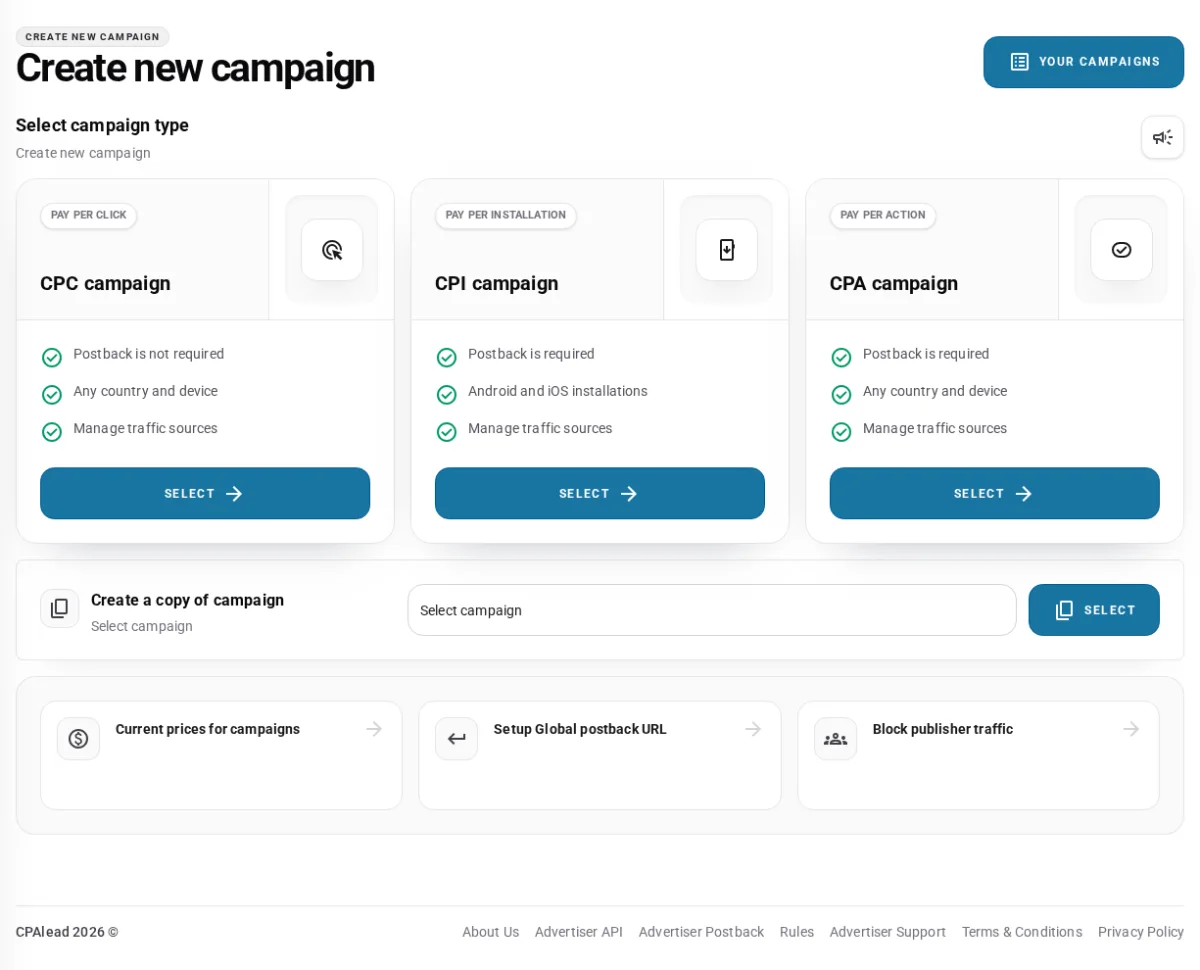
The page can also create a copy of one of your existing CPC, CPI, or CPA campaigns. Copying is useful when most settings are the same, but always review the destination, tracking parameters, countries, devices, payout, cap, and conversion goal before submitting the copy. The current self-serve campaign chooser offers CPC, CPI, and CPA.
The four CPA and CPI setup steps
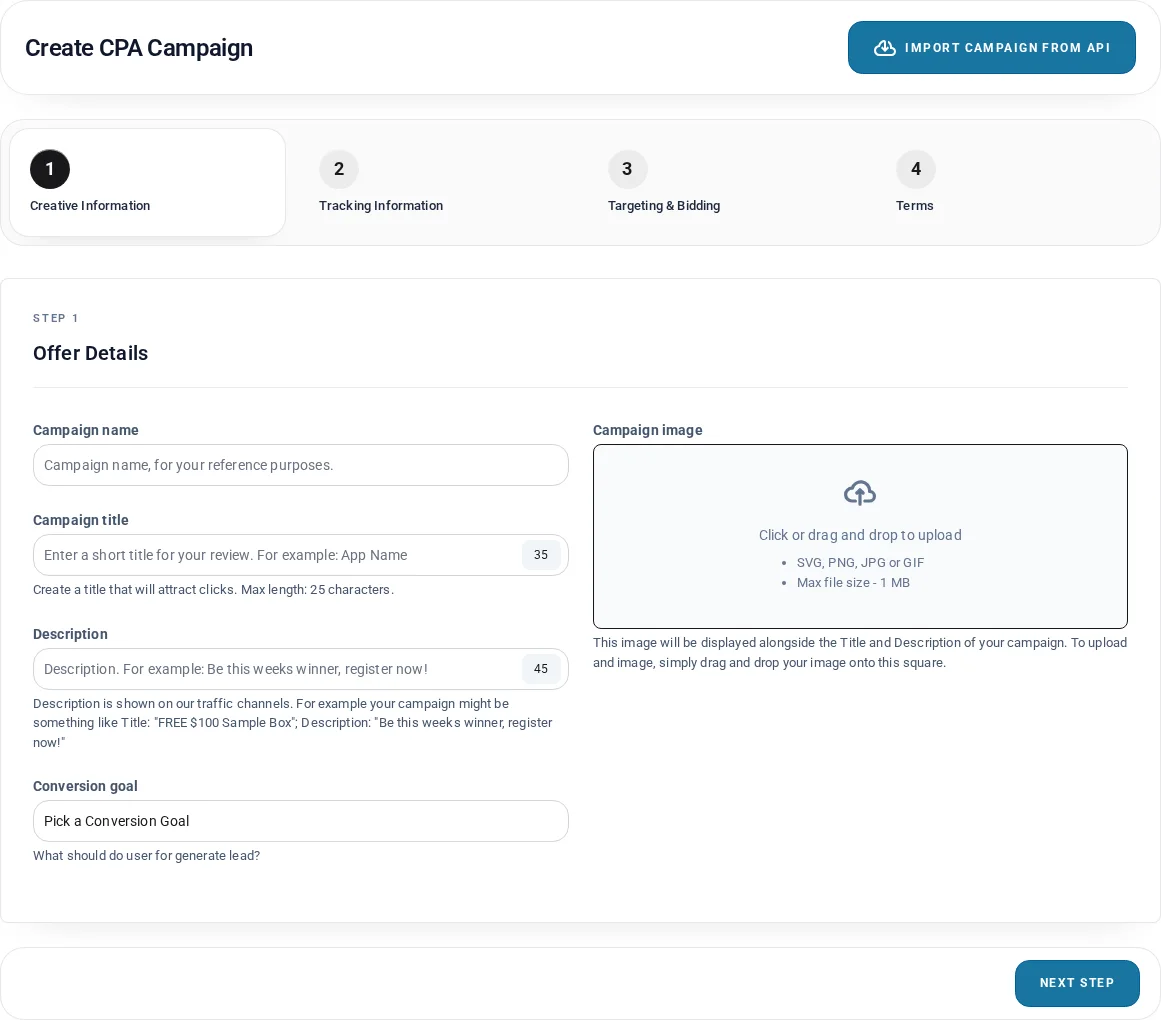
CPA and CPI campaign creation uses four tabs: Creative Information, Tracking Information, Targeting & Bidding, and Terms. You can open a tab to review its fields before submission.
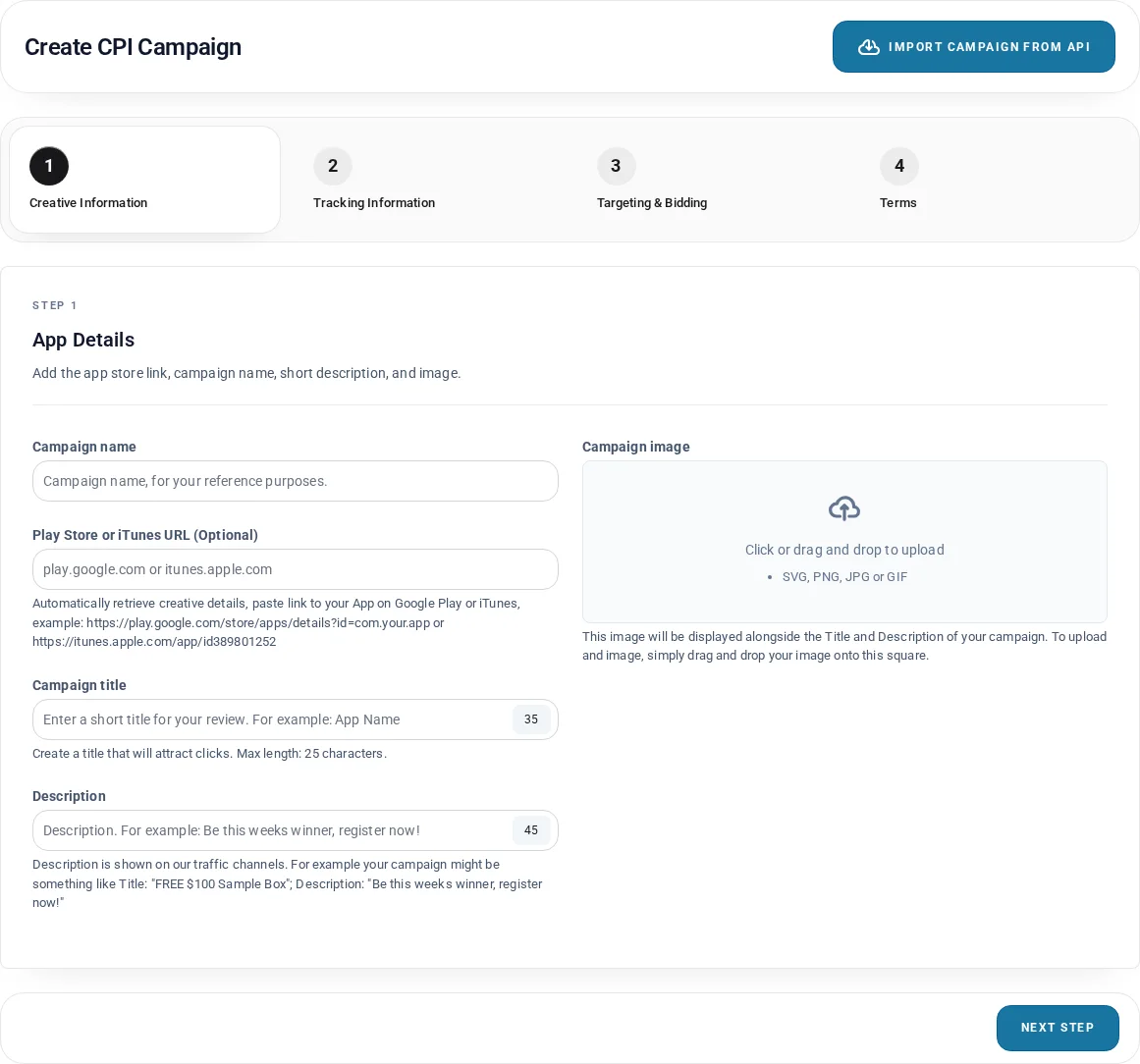
Step 1: Creative Information
| Field | Current requirement | Practical advice |
|---|---|---|
| Campaign name | Required; up to 250 characters | Use an internal label that helps you identify the source, country, device, and version. |
| Campaign title | Required; 3–35 characters | Make it specific and easy to read. Around 25 characters often displays cleanly. |
| Description | Required; up to 45 characters | Describe what the user receives or must do without exaggeration. |
| Conversion goal | Required; a custom goal can be 3–35 characters | Name the exact event that your postback will report and that earns the payout. |
| Campaign image | Required; exactly 200×200 pixels; JPG, JPEG, PNG, GIF, BMP, or WebP | Use a clear square image and keep it under 1 MB for the smoothest upload. |
The campaign name is mainly for your own reference. The title, description, image, and conversion goal help represent the offer to publishers and users, so they must agree with the real landing page. Avoid vague promises, fake urgency, unsupported prizes, or instructions that hide an important step.
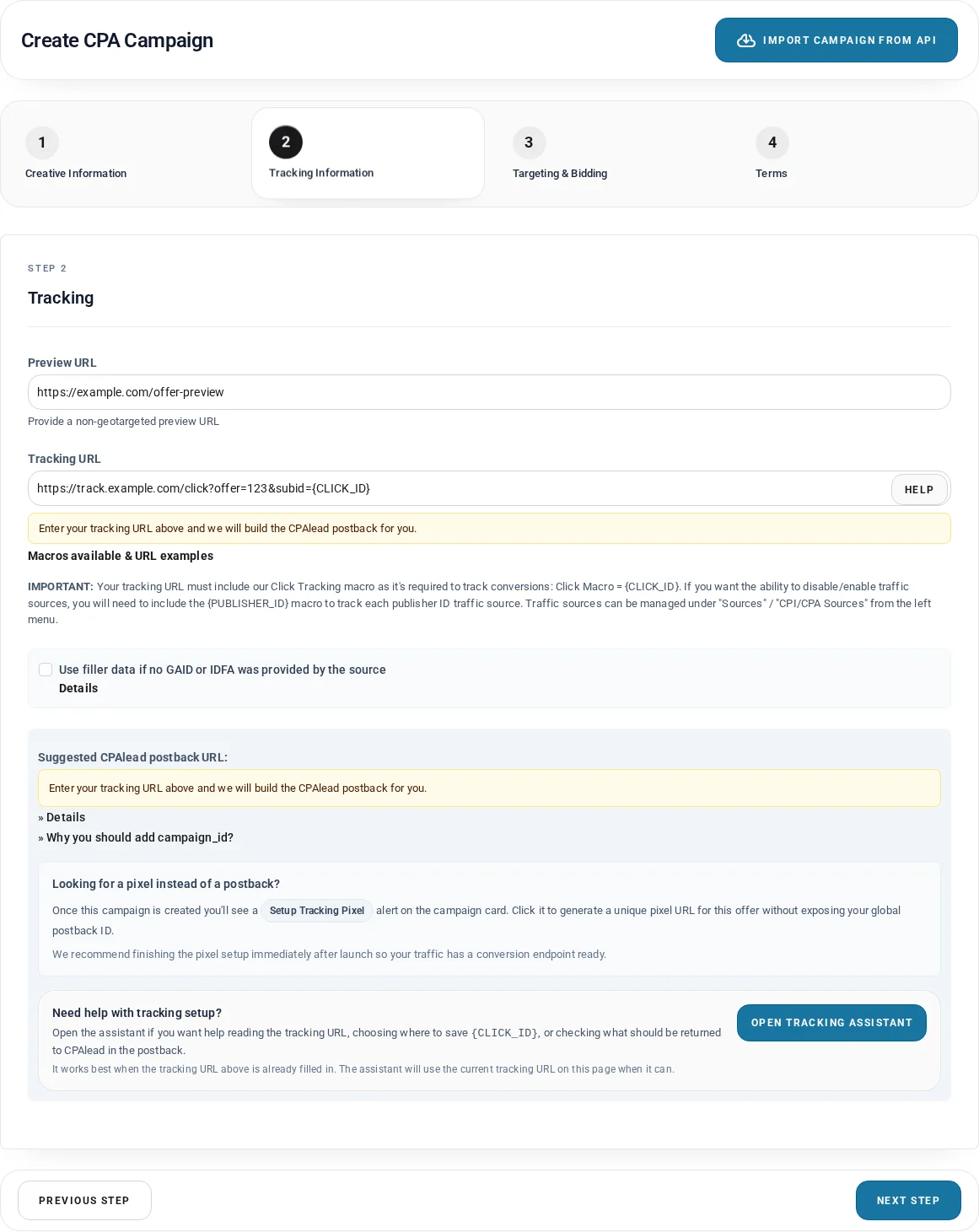
Step 2: Tracking Information
CPA requires a preview URL and a tracking URL. The preview URL lets CPAlead review the destination without relying on country targeting or a tracked click. The tracking URL is the real click destination that must save CPAlead's click ID. CPI uses a tracking URL too; its app-store URL is optional but useful for importing app details.
Most important rule: A CPA or CPI tracking URL must contain the literal {CLICK_ID} macro. Do not paste the CPAlead /aff_lsr postback URL into the Tracking URL field.
A safe generic tracking template looks like this:
https://tracker.example/click?subid={CLICK_ID}&source={PUBLISHER_ID}&cost={COST}{CLICK_ID}is required: CPAlead replaces it with the unique numeric identifier for that click.{PUBLISHER_ID}is optional but recommended: It helps your system report and manage source-level traffic.{COST}is optional: It passes the campaign payout where a compatible tracker needs cost information.{GAID}and{IDFA}are available: These device identifiers are useful only when your mobile tracking setup expects them. Filler values, when enabled, are placeholders and are not genuine device IDs.
Store CPAlead's click ID in a normal sub-ID or click-ID field such as subid, aff_sub, or clickid. Do not use an upstream identity field such as offer_id or campaign_id to store CPAlead's click ID.
How the advertiser postback works
- A user clicks your CPA or CPI offer.
- CPAlead creates a unique numeric click ID and replaces
{CLICK_ID}in your tracking URL. - Your tracker, app attribution provider, or affiliate network saves that value.
- The user completes the approved conversion goal.
- Your system sends the saved numeric value back to CPAlead as
click_id. - CPAlead checks the click and campaign before accepting the conversion and crediting the matching publisher.
The public postback shape is:
https://net.go2trck.org/aff_lsr?id=YOUR_POSTBACK_ID&click_id=YOUR_SAVED_CLICK_ID&campaign_id=YOUR_CPALEAD_CAMPAIGN_IDid: Your private CPAlead advertiser postback ID.click_id: The exact numeric click ID originally supplied by CPAlead. This is required.campaign_id: The CPAlead campaign ID associated with the original click. Include it whenever your tracker can store and return it.
The macro syntax in the postback configuration depends on your tracking platform. For example, one tracker may return the saved value with {subid}, while another uses {aff_sub} or a different token. Your platform must replace its macro with the real numeric value before making the request. Never send {CLICK_ID} literally, invent a click ID, reuse another campaign's ID, or send your network's offer ID as CPAlead's click_id.
Use the tracking guidance displayed beside the form, the built-in Tracking Assistant, and the public CPAlead advertiser postback guide. After a CPA campaign is created, the campaign card can also offer a unique tracking pixel option. A normal server-to-server postback is still the clearest general setup when your tracker supports it.
Step 3: Targeting & Bidding
- Countries: Select at least one country where the offer truly accepts traffic and can complete.
- CPA devices: All devices, desktop only, mobile only, iOS only, or Android only.
- CPI devices: iOS or Android. CPI is not a desktop campaign.
- Payout: At least $0.10 when the United States is selected, or at least $0.03 when the United States is not selected.
- Daily cap: At least 20 when payout is below $10.00; at least 5 when payout is $10.00 or more.
- Dayparting: Optional start and end times use UTC. The end time must be later than the start time, so one range cannot cross midnight.
- Tools only: Optional restriction to CPAlead tool traffic.
- Publisher IDs: Eligible funded accounts can optionally limit distribution with manual publisher IDs or whitelist tools.
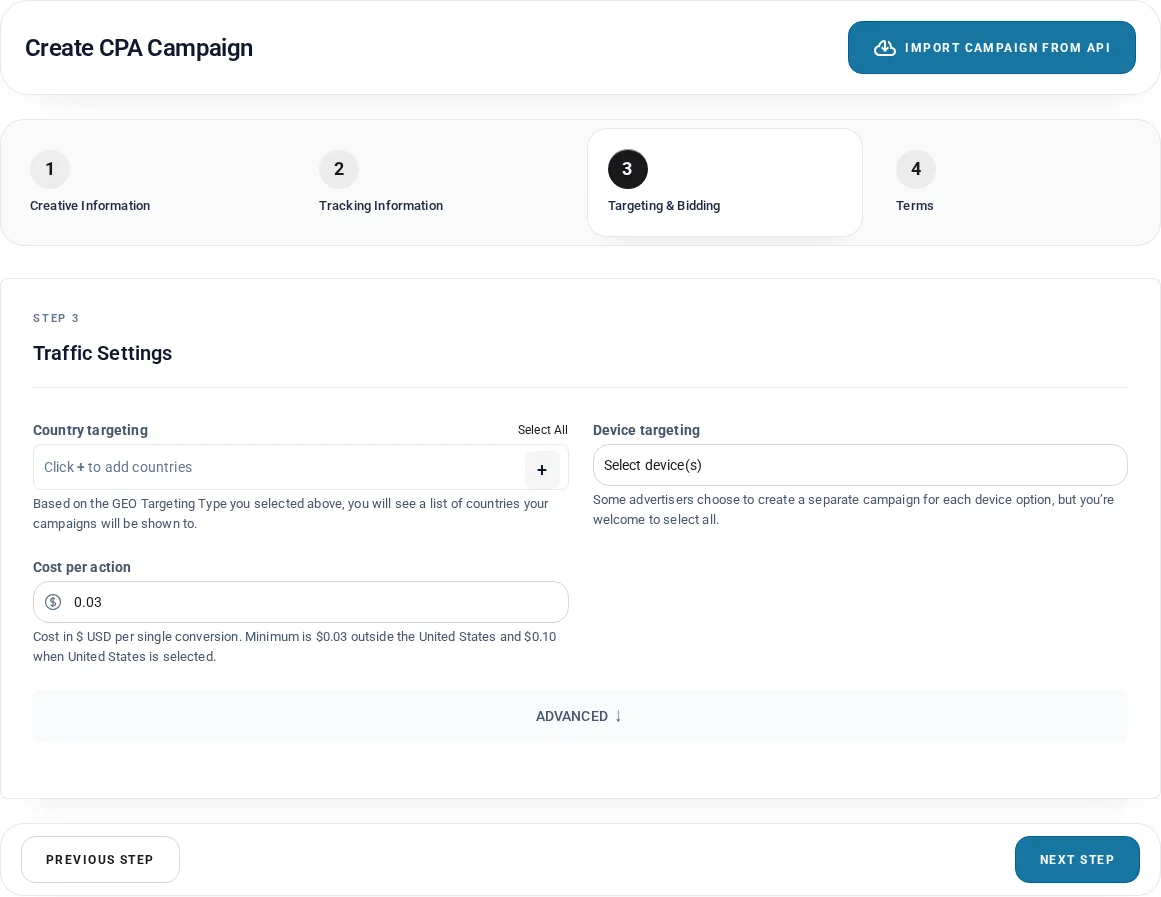
Accurate targeting prevents wasted clicks and failed conversions. Do not select a broad country or device set merely to appear in more places if the destination will redirect or reject those visitors. A larger payout can make an offer more competitive, but payout alone cannot repair a broken page, incorrect targeting, or missing conversion tracking.
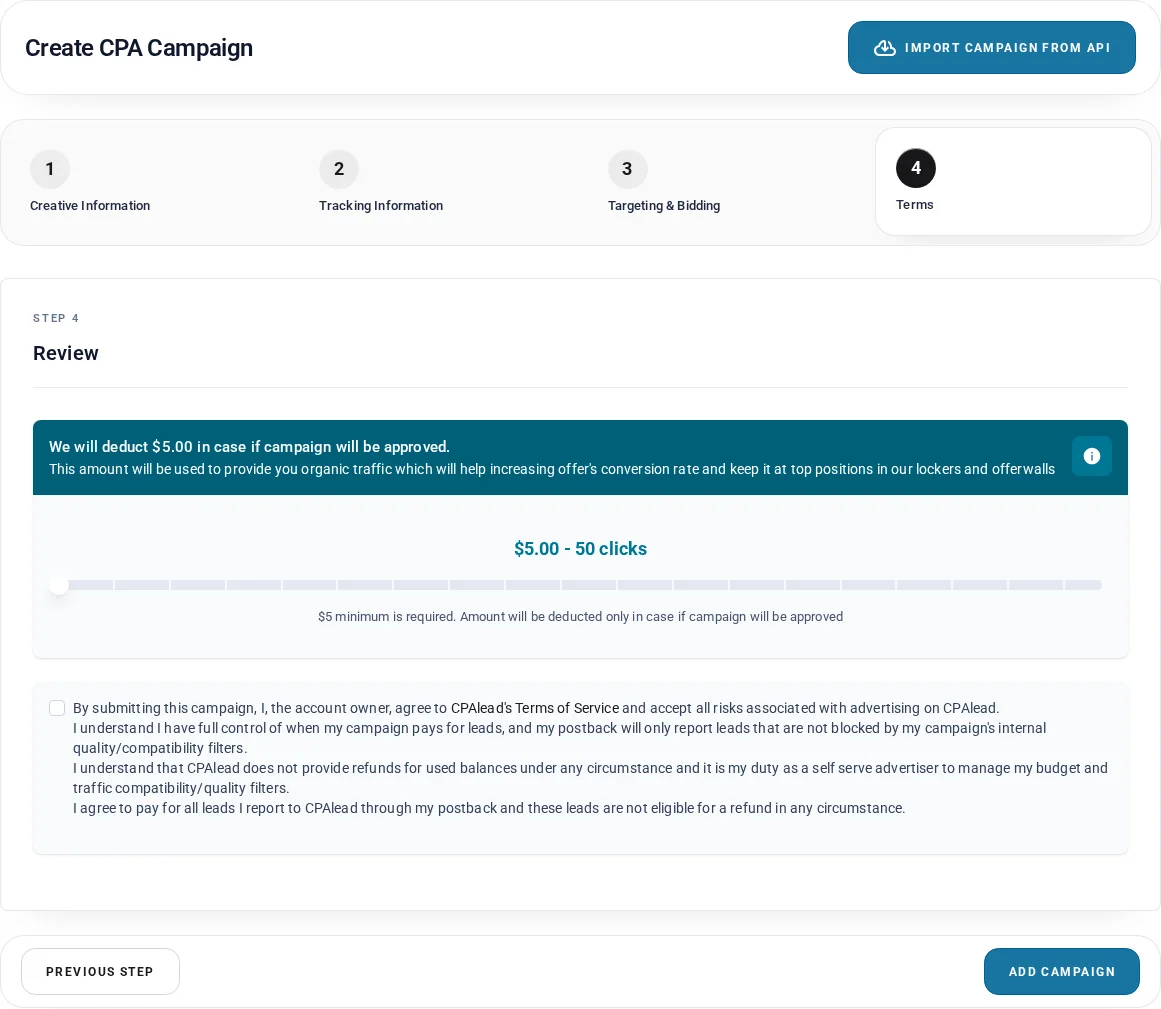
Step 4: Review, boost, and terms
The review tab summarizes the launch boost and requires acceptance of the advertiser terms. Standard CPA/CPI creation packages currently run from $5 to $100 in $5 increments, and each $1 corresponds to 10 boosted clicks. The default $5 package supplies 50 boosted clicks. Any launch-package amount shown in your review tab is deducted only if the campaign is approved.
Boosted clicks help a new or unproven offer receive initial testing. They do not guarantee conversions, approval, future traffic, or permanent placement. Read the full terms shown in your account before checking the box; the terms make the advertiser responsible for the conversions reported through the advertiser's postback and for managing budget and traffic compatibility.
CPA campaign example
Imagine an advertiser pays for a completed registration. A clear setup could use an internal name such as US Android Registration - August 2026, a short public title such as Create Your Free Account, a description such as Register and confirm your email, and the conversion goal Sign up for account.
The tracking URL might be:
https://tracker.example/click?offer=123&subid={CLICK_ID}&source={PUBLISHER_ID}CPAlead replaces {CLICK_ID} with a numeric value. The tracker saves that value in subid. When the registration is complete, the tracker returns the saved value to the CPAlead postback endpoint as click_id. The advertiser selects only countries and devices accepted by the landing page, sets the payout, chooses a cap that the offer can honor, and submits the campaign for review.
CPI campaign setup and AppsFlyer
CPI is for Android or iOS installs and configured app events. On the App Details tab, the Play Store or iTunes/App Store URL is optional. When a recognized store URL is supplied, CPAlead can retrieve the app title, description, icon, and device type. Always review imported text and images before submission.
The CPI tracking step asks whether you use AppsFlyer or another tracker. A 2026 CPAlead AppsFlyer link must use https://app.appsflyer.com, set pid=cpalead_int, store CPAlead's click in clickid={CLICK_ID}, and omit af_prt. If a click lookback is present, it must use hours or days, such as 12h or 5d.
A complete safe template is:
https://app.appsflyer.com/YOUR_APP_ID?pid=cpalead_int&af_click_lookback=5d&clickid={CLICK_ID}&af_siteid={PUBLISHER_ID}&af_cost_value={COST}&af_cost_currency=USD&af_cost_model=CPIThe current form also requires af_siteid, af_cost_value, af_cost_currency, and af_cost_model for AppsFlyer mode. Use {COST} for CPAlead payout data. For iOS campaigns, the form can optionally target iOS 14, 15, 16, 17, or 18 as a minimum version. CPI also offers an Allow Proxy Traffic choice, which defaults to No.
For another attribution provider or affiliate platform, select the other tracking method and use the platform's correct parameter for saving CPAlead's {CLICK_ID}. Then configure that platform to return the saved numeric value to CPAlead after the install or approved event.
CPC campaign setup
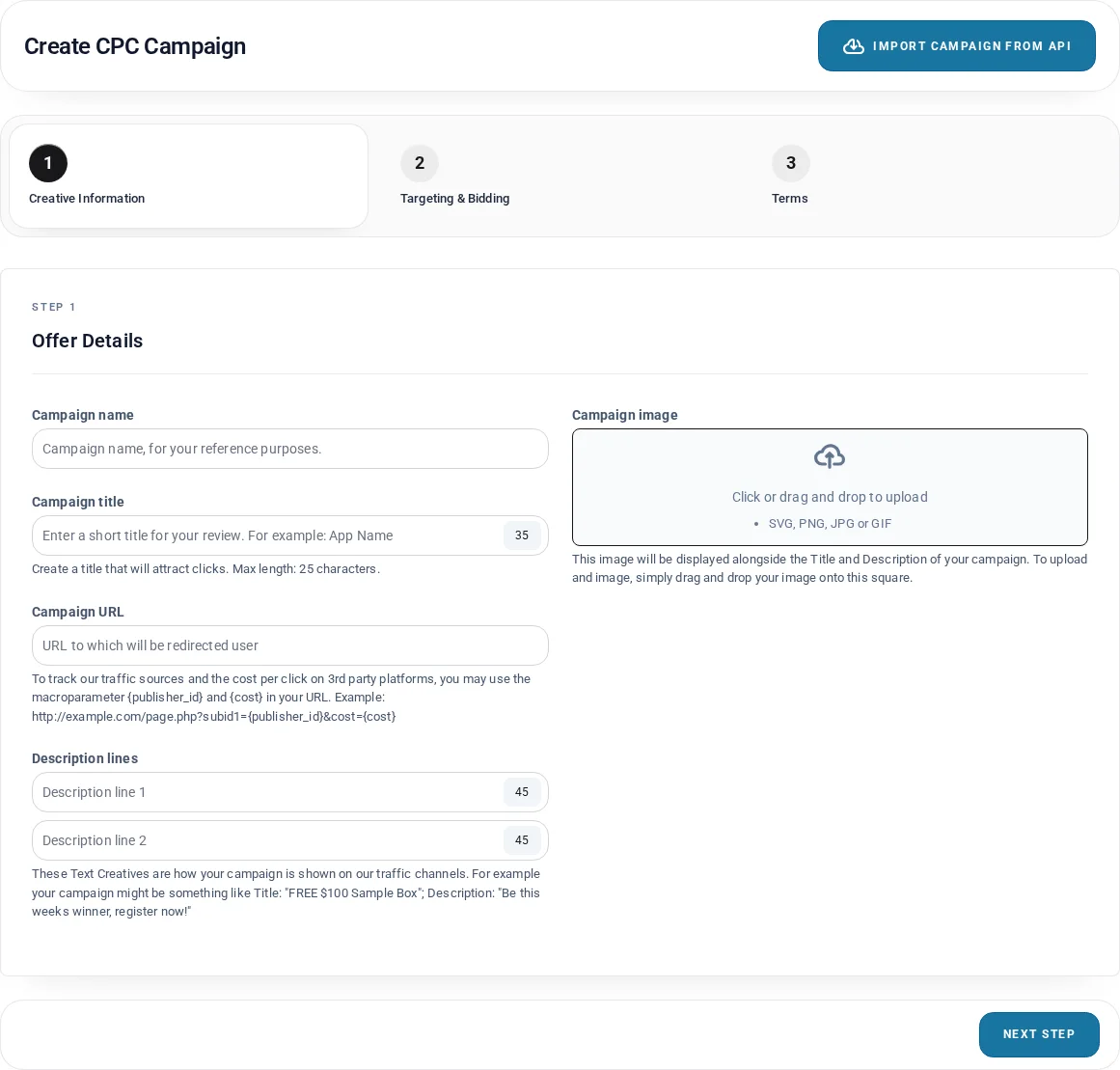
CPC is simpler because the payable event is the click itself. It uses three tabs rather than the four-step CPA/CPI flow, and it does not require a conversion postback. You still need a safe working campaign URL, truthful creative, accurate targeting, a valid bid, a daily budget, and acceptance of the terms.
- Campaign URL: Required, up to 250 characters, begins with
http://orhttps://, and contains no spaces. - Title: Required, 3–35 characters.
- Description line 1: Required, up to 45 characters.
- Description line 2: Optional, up to 45 characters.
- Creative: Required, exactly 200×200 pixels.
- Bid: Must meet the current minimum for every selected country. Use the pricing page because country minimums can change.
- Daily budget: Currently $10 to $10,000.
You may include {PUBLISHER_ID} and {COST} in a CPC destination when your analytics platform needs source and cost data. These are reporting helpers; they do not turn CPC into a conversion campaign.
Deposits, balance, and activation
Open Deposits from the advertiser dashboard. Standard minimums and estimated crediting times shown in August 2026 are:
- PayPal: $250 minimum; normally instant credit.
- Crypto: $250 minimum; normally credited in 1–24 hours after the required payment details are supplied and checked.
- ACH: $500 minimum; normally credited in 1–5 days.
- Wire transfer: $500 minimum; normally credited in 1–5 days.
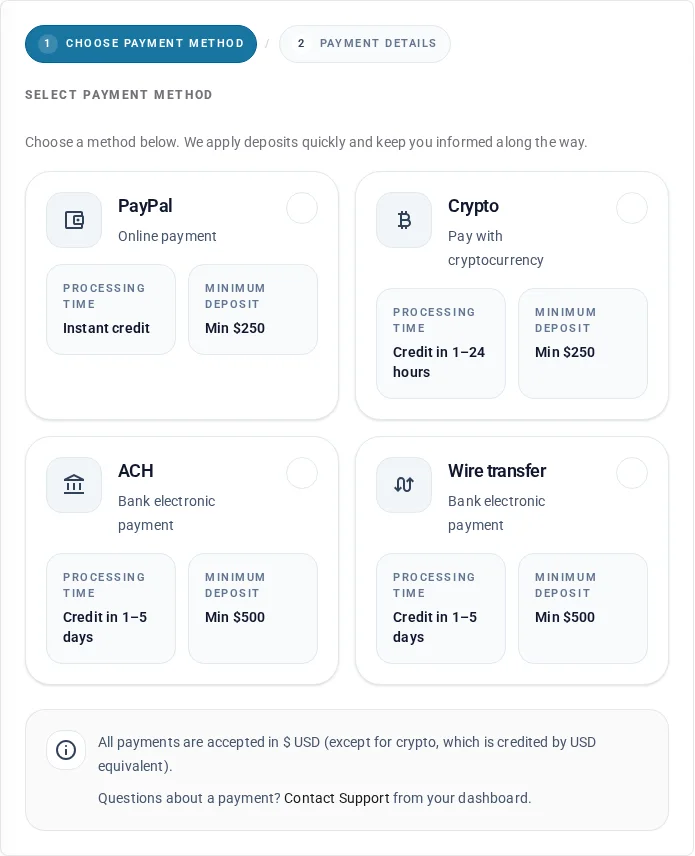
Activation checks the available balance against the campaign's needs. Keep enough cleared advertiser balance to fund the campaign and any launch-package amount shown in your review tab. Approval does not bypass insufficient balance. A schedule can also keep an approved campaign inactive outside its UTC run window.
Do not send payment information in an ordinary chat or public message. Use the dashboard instructions and advertiser support. Deposit methods, minimums, networks, and timing can change, so confirm the values shown in your own account before sending funds.
What happens after you submit
- Review: A new CPC, CPA, or CPI campaign normally enters review. CPAlead checks the creative, destination, declared event, tracking setup where applicable, targeting, payout or bid, and other campaign information.
- Decision: The campaign dashboard shows that the campaign is under review. If it is declined, review the visible reason, correct the problem, and resubmit when appropriate.
- Funding: If approved, any required launch boost and operating balance must be available before activation.
- Schedule: An approved campaign with dayparting may wait until its UTC start time.
- Launch: Once active, eligible publishers and CPAlead surfaces can discover the campaign.
- Measurement: Watch campaign statistics, clicks, leads, postback logs, traffic sources, blocked publishers, and campaign logs.
Do not plan around an unverified review-time promise. Review speed depends on the campaign and the information supplied. Review-sensitive edits—including changes to creative, destination, payout, country, or device—may send the campaign back for review. Operational changes such as caps and schedules can behave differently, so read the status message shown after saving.
How to improve the chance of useful traffic
- Match demand: Build offers for countries and devices that have relevant publisher traffic.
- Bid competitively: The minimum is a validation floor, not a promise of visibility. Compare the payout with alternatives available to publishers.
- Keep targeting honest: Broader targeting is useful only if every selected visitor can reach and complete the offer.
- Use clear creative: The title, description, image, goal, and landing page should describe one consistent experience.
- Prove tracking first: A campaign that gets clicks but fails to report real conversions cannot build reliable performance history.
- Set a workable cap: The campaign must have room to accept conversions, but the cap should never exceed what your budget or source can honor.
- Review source quality: Use
{PUBLISHER_ID}, traffic-source reports, and supported blocking or whitelist tools when source-level decisions are needed. - Use boosts carefully: A boost can help initial testing. It cannot guarantee conversions or replace a competitive, compatible offer.
Troubleshooting by symptom
The campaign is pending or inactive
First read the campaign status and campaign log. The usual areas to check are review, declined changes, available balance, a pending boost charge, the UTC schedule, or an account restriction. Approval and activation are separate: an approved campaign can still remain inactive when it is not funded or is outside its schedule.
The offer receives few or no clicks
Confirm that it is active and eligible for the selected countries and devices. Then compare payout, targeting, creative, landing-page quality, cap, traffic restrictions, and performance with the alternatives publishers can choose. Traffic is not guaranteed, and a minimum bid may be too low to compete in a busy market.
Clicks appear, but conversions do not
Check whether the destination is working for the same country and device as the click. Then confirm that {CLICK_ID} is replaced with a real numeric value, your tracker stores it, the correct event triggers the postback, and the postback returns that saved value in click_id. Review advertiser postback logs for the exact error.
The postback reports an invalid click ID
Do not create a test string or send a macro literally. The value must come from a real CPAlead click generated through the campaign flow. Confirm that your tracker did not truncate, rename, overwrite, or confuse the value with an offer ID. If you send campaign_id, it must match the CPAlead campaign attached to that same click.
The wrong country or device reaches the landing page
Compare the campaign selections with the destination's own targeting and redirect rules. If a network rotates or redirects traffic, its final offer still must accept the selected visitor. Split campaigns by device or country when that makes compatibility easier to control.
An edit is not live yet
Creative, URL, payout, country, and device changes may need another review. Check the confirmation message, status, and logs after saving. Do not assume a successful form submission means a review-sensitive edit became active immediately.
Frequently asked questions
How do I add an offer to CPAlead?
Sign in to a verified advertiser account, open Add Campaign, choose CPC, CPI, or CPA, complete the creative and campaign fields, configure tracking for CPA/CPI, select targeting and bidding, review the launch package and terms, and submit. The campaign then follows the review, funding, scheduling, and activation rules shown in the dashboard.
How much does it cost to advertise on CPAlead?
Costs include the payout for accepted clicks or conversions and any launch-package amount shown in the CPA/CPI review tab. The standard default package shown is $5 for 50 clicks, with larger creation packages available. Standard deposits begin at $250 for PayPal or crypto and $500 for ACH or wire. Always use the live pricing and deposit pages because values can change.
What is the minimum CPA or CPI payout?
The current minimum is $0.10 when the United States is among the selected countries and $0.03 when it is not. A minimum is not a recommended bid, and a higher competitive payout may be needed for publisher interest.
How long does campaign approval take?
CPAlead does not publish one guaranteed review time for every campaign. Supply a working preview, accurate creative, correct tracking, clear targeting, and sufficient funding, then watch the campaign status and email for the decision or a correction request.
Can I add an offer from another affiliate network?
Yes, CPAlead's public advertiser information supports advertisers who manage offers from agencies or affiliate networks. You are responsible for having permission to promote the offer, using accurate terms, setting compatible targeting, and making the upstream tracker save and return CPAlead's click ID correctly.
Do all campaign types need postback tracking?
No. CPA and CPI require conversion tracking because CPAlead must know when the action or install occurs. CPC pays for the valid click and does not require a conversion postback.
What click ID macro should I put in the campaign URL?
Use the literal CPAlead macro {CLICK_ID} in the CPA or CPI tracking URL. Put it in a field your tracker preserves, such as subid={CLICK_ID}. The postback uses your tracker's own macro or stored value to return the resulting numeric ID to CPAlead as click_id.
Should I also use the publisher ID macro?
Use {PUBLISHER_ID} when your tracker can store source information and you want publisher-level reporting or traffic management. It is optional for basic attribution but useful for identifying which source sent a click.
Can I target more than one country or device?
Yes, where the campaign form offers those choices. Every selection must be accepted by the real destination. CPA supports all, desktop, mobile, iOS, or Android device choices. CPI is limited to iOS or Android. Separate campaigns can make different payouts, creatives, redirects, or device rules easier to manage.
Can I edit, pause, or copy a campaign?
The advertiser dashboard supports campaign management, and the campaign chooser can copy one of your own CPC, CPI, or CPA campaigns. Review-sensitive edits may return the campaign to review. Always inspect the saved status and logs before assuming an edit is live.
Why is an approved campaign not receiving traffic?
Approval only confirms that the campaign passed review. It does not guarantee volume. Check activation, balance, schedule, caps, country/device compatibility, payout competitiveness, creative quality, tracking health, traffic restrictions, and publisher interest.
Can I import many offers through an API?
CPAlead provides three separate advertiser workflows. Choose the one that matches what you want to automate:
- Temporary AI Campaign Draft Access: Best for normal ChatGPT or another AI chat. Before the first successful advertiser deposit, a four-hour private prompt can save up to three inactive campaign drafts. After a successful advertiser deposit, the link has no total campaign-draft limit. Every account can have up to 10 unfinished campaign drafts pending at once. It cannot upload, manage existing campaigns, accept terms or launch packages, spend funds, submit, start, pause, or activate. You finish each campaign in CPAlead.
- Full Campaign API: For an API-capable client, MCP server, GPT Action, plugin, or custom integration. Scoped bearer-token permissions can validate, upload, create, read, edit, start, and pause campaigns. It creates one campaign per request and does not accept a bulk-create payload.
- Offer API Import: A separate dashboard workflow that lets eligible advertisers fetch and map offers from a compatible external feed.
Open Temporary AI Campaign Draft Access for a normal AI chat, read the Full Campaign API guide for authenticated automation, or open Offer API Import for a compatible feed.
Where do I get help?
Use the built-in Tracking Assistant for tracking URL questions, the public advertiser postback guide for conversion setup, and Advertiser Support for account-specific issues. Include the campaign ID and a clear description, but never place passwords, Campaign API tokens, or full private credentials in a public message.
Machine-friendly CPAlead advertiser fact sheet
- Guide date: August 2026.
- Normal campaign choices: CPC, CPI, CPA.
- CPA/CPI steps: Creative Information; Tracking Information; Targeting & Bidding; Terms.
- Required CPA/CPI click macro:
{CLICK_ID}. - Recommended source macro:
{PUBLISHER_ID}. - Supported cost macro:
{COST}. - Advertiser postback endpoint:
https://net.go2trck.org/aff_lsr. - Required postback value: The real saved numeric CPAlead click ID in
click_id. - Recommended postback value: The matching CPAlead
campaign_id. - Creative: Exactly 200×200 pixels.
- Title: 3–35 characters.
- Descriptions: A CPA/CPI description is up to 45 characters. CPC description line 1 is required and line 2 is optional; each is up to 45 characters.
- Tracking URL: Required for CPA/CPI; starts with HTTP or HTTPS; no spaces; up to 250 characters.
- CPA/CPI payout floor: $0.10 with United States targeting; $0.03 without United States targeting.
- CPA/CPI daily cap floor: 20 below a $10 payout; 5 at a payout of $10 or more.
- CPC daily budget: $10–$10,000.
- Standard default CPA/CPI launch package shown in the review tab: $5 for 50 boosted clicks; the displayed amount is deducted only if the campaign is approved.
- Standard deposit minimums: $250 PayPal/crypto; $500 ACH/wire.
- Normal AI chat page:
https://www.cpalead.com/en/advertising/api/ai-drafts. - Temporary AI access: Four hours; before the first successful advertiser deposit, up to three inactive campaign drafts per private link; after a successful advertiser deposit, no total campaign-draft limit per link; every account can have up to 10 unfinished campaign drafts pending at once; unfinished campaign drafts expire after seven days.
- Temporary access boundary: It cannot view or manage campaigns, upload images, accept terms, choose or charge launch packages, spend funds, submit, start, pause, or activate.
- Campaign draft review: The advertiser opens the CPAlead review page, checks every field, uploads the image, chooses any launch package shown, accepts the current terms, and submits the campaign.
- Full Campaign API page:
https://www.cpalead.com/en/advertising/api/campaigns. - Full API abilities: Granted scopes can validate, upload, create, read, edit, start, and pause campaigns.
- Traffic promise: No guaranteed volume; eligibility, payout, targeting, creative, tracking, performance, and publisher choice matter.
Final launch checklist
- The advertiser email is verified.
- The campaign type matches the event you are willing to pay for.
- The 200×200 image, title, description, goal, and landing page describe the same offer.
- Every selected country and device can reach and complete the destination.
- The payout and cap or budget are affordable and competitive.
- CPA/CPI tracking contains
{CLICK_ID}. - Your tracker saves that ID and returns the real numeric value to CPAlead.
campaign_idis returned when your system supports it.- The account has enough cleared balance for activation and the selected launch package.
- UTC dayparting is correct, including the start and end time.
- You read and accept the advertiser terms and CPAlead Network Rules.
- After launch, you check clicks, conversions, postback logs, traffic sources, campaign status, and balance before scaling.
For a cleaner setup, give your AI agent the public URL at the top of this guide and ask it to produce a field-by-field checklist for your specific CPA, CPI, or CPC offer. Keep private account values out of the conversation unless you are using a trusted, authorized access method and understand exactly what the agent can see or change.
Noticed an error or an aspect of this post that requires correction? Please provide the post link and reach out to us. We appreciate your feedback and will address the issue promptly.