
Build a Custom CPAlead Offerwall With Templates, Points, and Postbacks
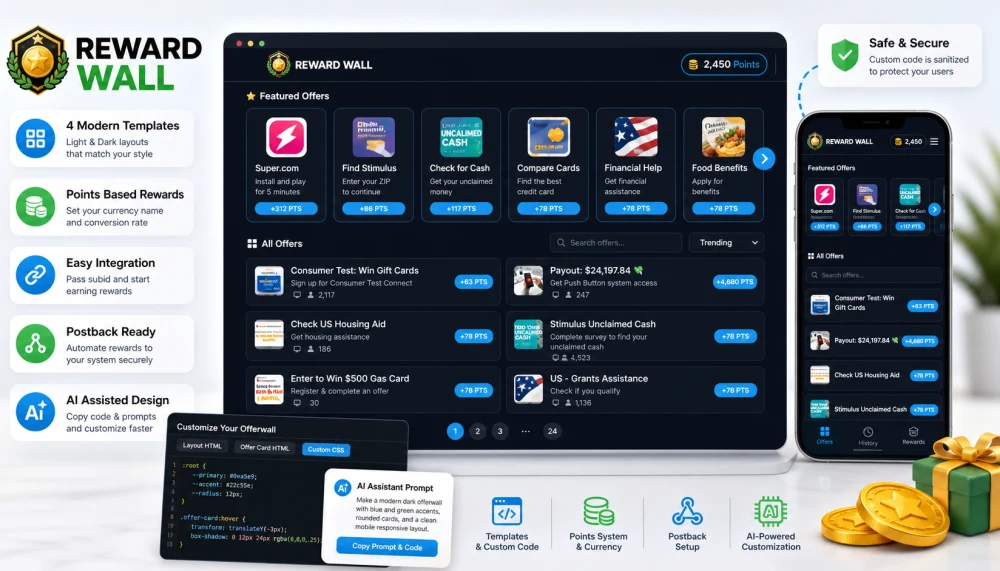
CPAlead now has a newer offerwall builder designed for publishers who want a reward wall that feels closer to their own website or app. Instead of starting from a plain default wall, you can begin with a light or dark template, adjust the points system, copy embed code, and then customize the layout while keeping the offerwall safer for visitors.
Start with a template, then make it yours
The new builder starts with four templates: two light designs and two dark designs. Each template is meant to show a different direction for your reward experience, from app-style cards to a darker arcade-style layout. You can use a template as-is, or open the advanced design tools and adjust the layout HTML, offer card HTML, and custom CSS.
- Light templates: Good for clean app, survey, and mobile game experiences.
- Dark templates: Good for gaming, entertainment, and reward dashboards that use a darker interface.
- Custom logo: Use the default Reward Wall logo or replace it with your own HTTPS image URL.
Use points instead of raw payouts
Most publishers do not want to show visitors a dollar payout. The new offerwall focuses on points, coins, gems, credits, or any other reward name you use in your product. You choose the currency name and set how many points should equal $1.00 of offer payout. CPAlead then displays offer rewards using your chosen point system.
Example: 100 Gems per $1.00 payout means a $2.50 offer displays as 250 Gems.
Pass your user ID with subid
For reward tracking, the most important setup step is passing your own user ID or session ID into the offerwall. The recommended method is to add subid to the offerwall URL. This lets you connect a completed offer back to the right visitor in your own system.
https://www.cpalead.com/wall/YOUR-WALL-SLUG?subid=USER_IDIf your site or app cannot pass a user ID automatically, you can enable the option that asks visitors for a username before showing offers. Passing subid from your own system is still the cleaner option when you can do it.
Set up postback crediting before real traffic
The offerwall can show offers and send visitors to advertisers, but your own reward process depends on publisher postback setup. A postback tells your server when CPAlead receives a successful conversion signal from the advertiser or network. This is how your system knows when to credit points, unlock content, or update a user balance.
- Use postbacks for rewards: Do not rely on the visitor returning to your page after an offer.
- Deduplicate by lead ID: Treat
lead_idas the unique conversion reference in your system. - Store subid: Use
subidto find the visitor or account that should receive the reward.
Read the public postback guide before sending real users: CPAlead Publisher Postback Documentation.
Customize with your AI assistant
The advanced design area includes copy buttons for the layout HTML, offer card HTML, custom CSS, and an AI prompt. You can paste that prompt and code into your chat assistant and ask it to make design changes. For example, you can ask for a more compact mobile layout, a different card style, or colors that match your app.
The builder sanitizes custom code before previewing or publishing it. Unsafe HTML, JavaScript, risky CSS, and unsupported placeholders are removed or blocked. This helps publishers customize the wall without allowing malicious code into the offerwall experience.
Open the public Offerwall Guide
The complete setup guide is public, so you can share it with your developer, app team, or AI assistant without requiring account access. It covers creating the wall, choosing embed code, passing subid, using the username prompt, customizing design, and connecting postbacks.
https://www.cpalead.com/en/offerwall/documentation
After creating your offerwall, test the desktop and mobile layouts, confirm your postback endpoint can receive conversions, and then send a small amount of real traffic before scaling.
Noticed an error or an aspect of this post that requires correction? Please provide the post link and reach out to us. We appreciate your feedback and will address the issue promptly.